> ## Documentation Index
> Fetch the complete documentation index at: https://docs.plannotator.ai/llms.txt
> Use this file to discover all available pages before exploring further.
# What Is a Claude File? How CLAUDE.md Works
> A CLAUDE.md file gives Claude Code project instructions. Learn when Claude loads it, how nested files work, and how it differs from auto memory.
A **Claude file** usually means `CLAUDE.md`: a plain Markdown file that gives Claude Code instructions about a project. Claude adds the file to its context, then uses it while it reads code, plans work, edits files, and runs commands.
`CLAUDE.md` is not a model, a database, or a hidden configuration format. It is a document for guidance that should apply across many tasks.
*Last reviewed July 18, 2026. Maintained by the Plannotator project.*
 ## When does Claude Code load CLAUDE.md?
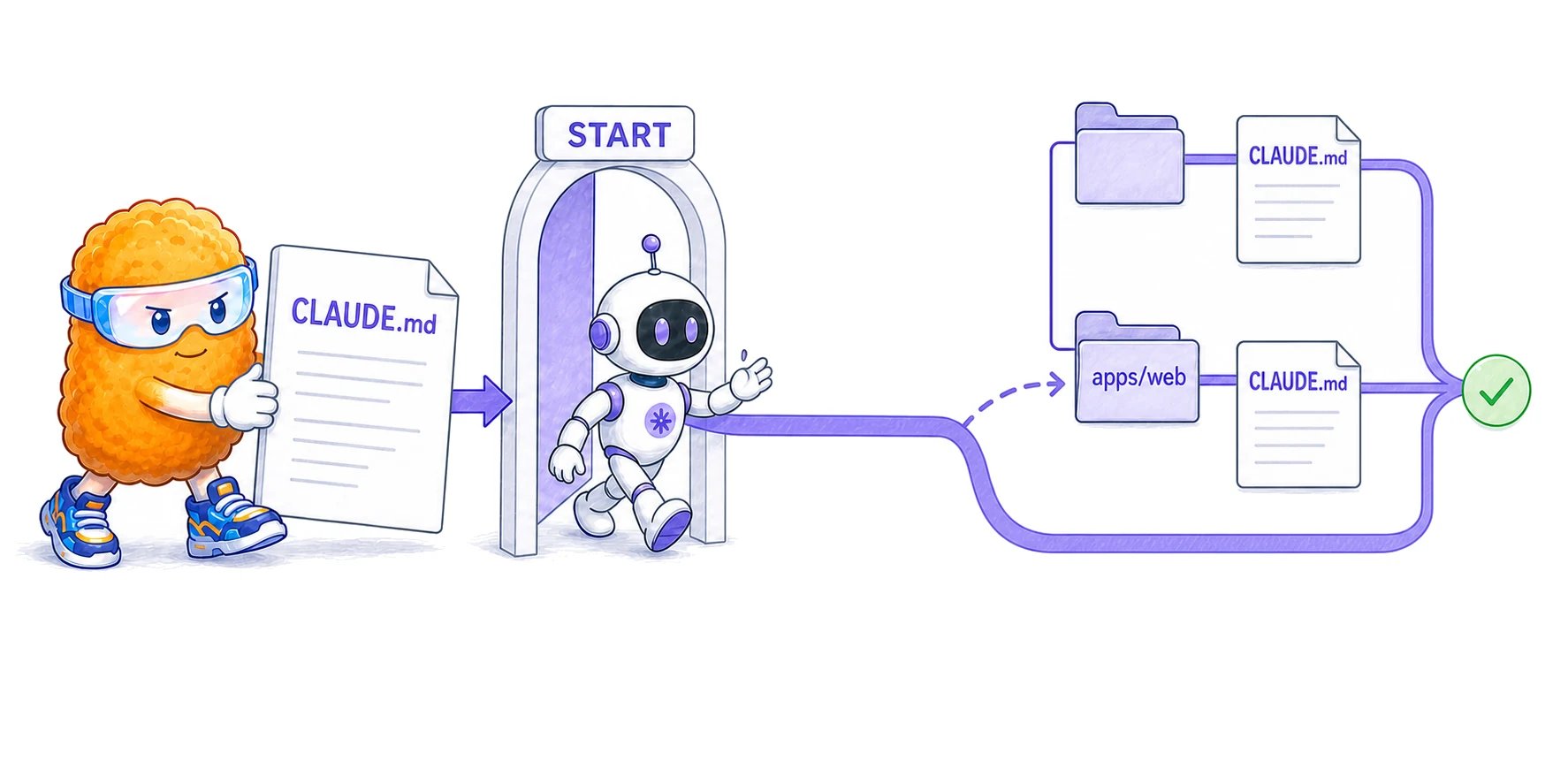
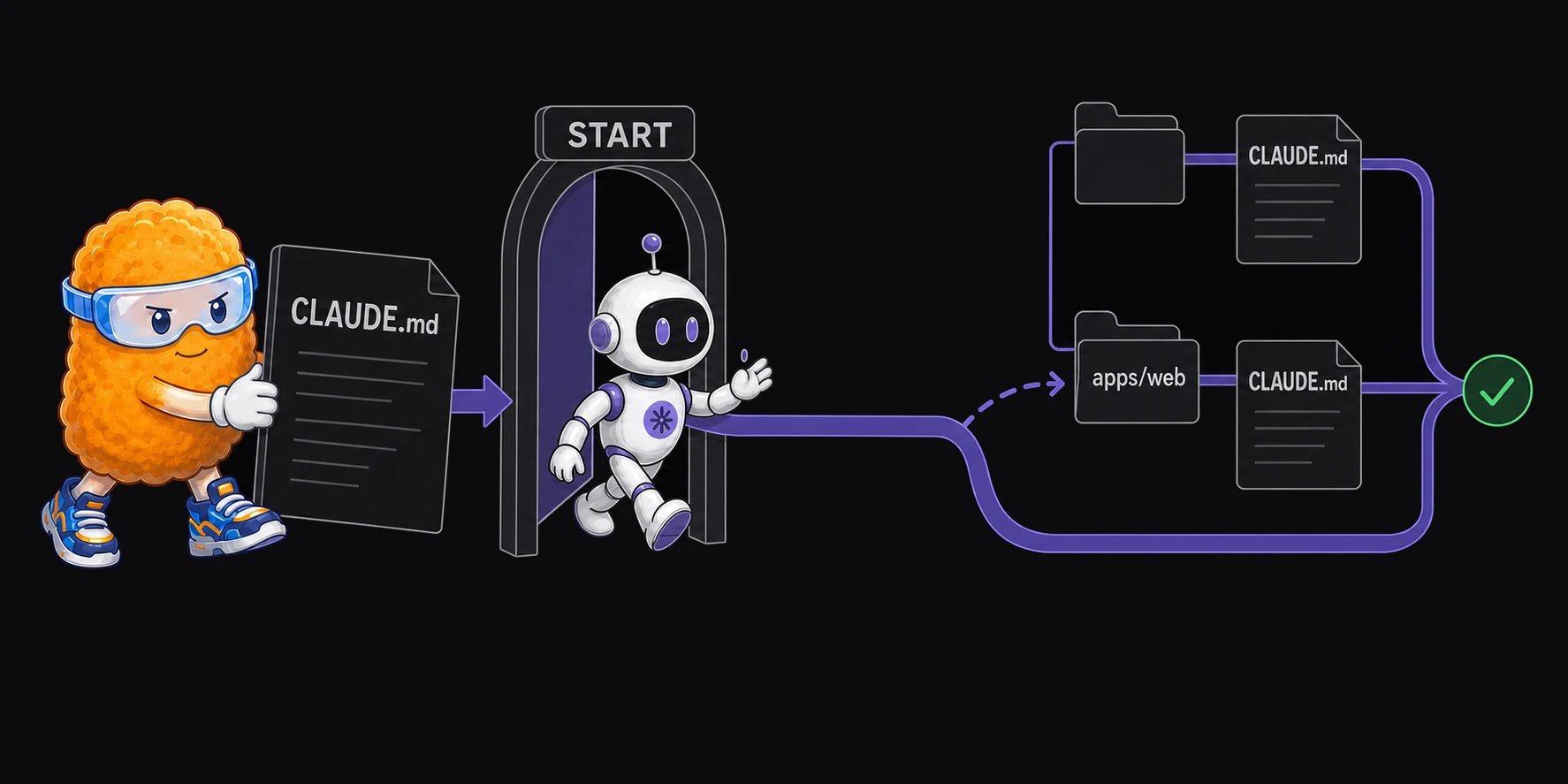
Claude Code looks for instruction files when a session starts. It also loads more specific files when it begins working in a nested directory.
| Location | When Claude loads it | Scope |
| -------------------------------------- | ------------------------------------------------------------------ | ------------------------------------ |
| `~/.claude/CLAUDE.md` | At the start of every session | Every project for one user |
| `./CLAUDE.md` or `./.claude/CLAUDE.md` | At the start of a session launched in that project | The project and its files |
| `./CLAUDE.local.md` | At the start of a session, after the shared file at the same level | One user's local copy of the project |
| `apps/web/CLAUDE.md` | When Claude reads a file inside `apps/web` | That directory and its children |
| A file imported with `@path/to/file` | When the CLAUDE.md that imports it loads | The same scope as the importing file |
Claude also reads applicable `CLAUDE.md` files in parent directories. This lets a monorepo keep shared instructions at the root and package-specific instructions closer to each package. Anthropic documents the full search order in its [Claude Code memory guide](https://code.claude.com/docs/en/memory).
## How often does Claude read the file?
Claude loads the applicable files when a session starts. It does not reread every `CLAUDE.md` before every reply.
If you edit the file during a session, Claude picks up the change after the next `/compact` or when you open `/memory`. Otherwise, start a new session. After compaction, Claude restores the root instructions. It reloads a nested file when it next reads a file in that directory.
An imported file also consumes context. Imports can reduce duplication, but they do not make the imported text free.
## Which CLAUDE.md file wins?
Claude combines the files it finds from broad scope to narrow scope. A file closer to the current work appears later in the combined context, but it does not erase the broader file.
Do not rely on conflicting instructions. Keep shared rules at the project root. Put only the differences in nested or local files.
## Is CLAUDE.md the same as memory?
No. Claude Code uses the word *memory* for more than one feature, but the files have different owners and jobs.
| Source | Who writes it | What it should contain | Where it lives |
| -------------------- | ----------------- | -------------------------------------------------- | -------------------------------------- |
| `CLAUDE.md` | You and your team | Stable commands, constraints, and project guidance | The repository or your home directory |
| Auto memory | Claude Code | Notes Claude chooses to keep across sessions | `~/.claude/projects//memory/` |
| Conversation history | You and Claude | The current task and its working context | The current or resumed session |
Treat `CLAUDE.md` as standing instructions, not as a diary of past sessions. Auto memory is machine-local. Claude loads the first 200 lines of its `MEMORY.md` at startup and reads linked topic files when needed. The [Claude Code memory guide](https://code.claude.com/docs/en/memory) explains both systems.
## Can Claude ignore CLAUDE.md?
Yes. Claude Code adds `CLAUDE.md` as a user message after its system prompt. The file guides the model, but it does not enforce a rule.
Use [hooks](https://code.claude.com/docs/en/hooks) or permissions when a check must run every time. Use `CLAUDE.md` to explain what good work looks like and which commands Claude should use.
## How can you check what Claude loaded?
Run `/memory` in Claude Code. It lists the instruction files loaded for the session and lets you open them. For deeper debugging, the [`InstructionsLoaded` hook](https://code.claude.com/docs/en/hooks#instructionsloaded) can log each loaded instruction file.
## What should go in CLAUDE.md?
Include facts Claude cannot safely infer from the repository:
* build and test commands;
* rules that differ from common defaults;
* files or directories it must not change;
* checks required before work is complete;
* links to detailed docs Claude should read only when needed.
Keep it short. Remove general advice and facts the code already makes clear. For a writing checklist and examples, read [How to Write a Good AGENTS.md (or CLAUDE.md)](/learn/ai-development/how-to-write-a-good-agents-md).
## How is CLAUDE.md different from AGENTS.md?
Claude Code reads `CLAUDE.md` by default. It does not load `AGENTS.md` by name.
If your team uses both Claude Code and agents that support `AGENTS.md`, keep one source of truth. A `CLAUDE.md` file can import the shared file with `@AGENTS.md`, or you can use a symbolic link where your tools and operating systems support one. Anthropic describes this setup in its [CLAUDE.md context guide](https://support.claude.com/en/articles/14553240-give-claude-context-claude-md-and-better-prompts).
## When does Claude Code load CLAUDE.md?
Claude Code looks for instruction files when a session starts. It also loads more specific files when it begins working in a nested directory.
| Location | When Claude loads it | Scope |
| -------------------------------------- | ------------------------------------------------------------------ | ------------------------------------ |
| `~/.claude/CLAUDE.md` | At the start of every session | Every project for one user |
| `./CLAUDE.md` or `./.claude/CLAUDE.md` | At the start of a session launched in that project | The project and its files |
| `./CLAUDE.local.md` | At the start of a session, after the shared file at the same level | One user's local copy of the project |
| `apps/web/CLAUDE.md` | When Claude reads a file inside `apps/web` | That directory and its children |
| A file imported with `@path/to/file` | When the CLAUDE.md that imports it loads | The same scope as the importing file |
Claude also reads applicable `CLAUDE.md` files in parent directories. This lets a monorepo keep shared instructions at the root and package-specific instructions closer to each package. Anthropic documents the full search order in its [Claude Code memory guide](https://code.claude.com/docs/en/memory).
## How often does Claude read the file?
Claude loads the applicable files when a session starts. It does not reread every `CLAUDE.md` before every reply.
If you edit the file during a session, Claude picks up the change after the next `/compact` or when you open `/memory`. Otherwise, start a new session. After compaction, Claude restores the root instructions. It reloads a nested file when it next reads a file in that directory.
An imported file also consumes context. Imports can reduce duplication, but they do not make the imported text free.
## Which CLAUDE.md file wins?
Claude combines the files it finds from broad scope to narrow scope. A file closer to the current work appears later in the combined context, but it does not erase the broader file.
Do not rely on conflicting instructions. Keep shared rules at the project root. Put only the differences in nested or local files.
## Is CLAUDE.md the same as memory?
No. Claude Code uses the word *memory* for more than one feature, but the files have different owners and jobs.
| Source | Who writes it | What it should contain | Where it lives |
| -------------------- | ----------------- | -------------------------------------------------- | -------------------------------------- |
| `CLAUDE.md` | You and your team | Stable commands, constraints, and project guidance | The repository or your home directory |
| Auto memory | Claude Code | Notes Claude chooses to keep across sessions | `~/.claude/projects//memory/` |
| Conversation history | You and Claude | The current task and its working context | The current or resumed session |
Treat `CLAUDE.md` as standing instructions, not as a diary of past sessions. Auto memory is machine-local. Claude loads the first 200 lines of its `MEMORY.md` at startup and reads linked topic files when needed. The [Claude Code memory guide](https://code.claude.com/docs/en/memory) explains both systems.
## Can Claude ignore CLAUDE.md?
Yes. Claude Code adds `CLAUDE.md` as a user message after its system prompt. The file guides the model, but it does not enforce a rule.
Use [hooks](https://code.claude.com/docs/en/hooks) or permissions when a check must run every time. Use `CLAUDE.md` to explain what good work looks like and which commands Claude should use.
## How can you check what Claude loaded?
Run `/memory` in Claude Code. It lists the instruction files loaded for the session and lets you open them. For deeper debugging, the [`InstructionsLoaded` hook](https://code.claude.com/docs/en/hooks#instructionsloaded) can log each loaded instruction file.
## What should go in CLAUDE.md?
Include facts Claude cannot safely infer from the repository:
* build and test commands;
* rules that differ from common defaults;
* files or directories it must not change;
* checks required before work is complete;
* links to detailed docs Claude should read only when needed.
Keep it short. Remove general advice and facts the code already makes clear. For a writing checklist and examples, read [How to Write a Good AGENTS.md (or CLAUDE.md)](/learn/ai-development/how-to-write-a-good-agents-md).
## How is CLAUDE.md different from AGENTS.md?
Claude Code reads `CLAUDE.md` by default. It does not load `AGENTS.md` by name.
If your team uses both Claude Code and agents that support `AGENTS.md`, keep one source of truth. A `CLAUDE.md` file can import the shared file with `@AGENTS.md`, or you can use a symbolic link where your tools and operating systems support one. Anthropic describes this setup in its [CLAUDE.md context guide](https://support.claude.com/en/articles/14553240-give-claude-context-claude-md-and-better-prompts).