> ## Documentation Index
> Fetch the complete documentation index at: https://docs.plannotator.ai/llms.txt
> Use this file to discover all available pages before exploring further.
# Review GitButler Workspaces, Stacks, and Branches
> Review a GitButler workspace, stacked branches, or one branch layer in Plannotator, with exact detection rules, limits, and troubleshooting.
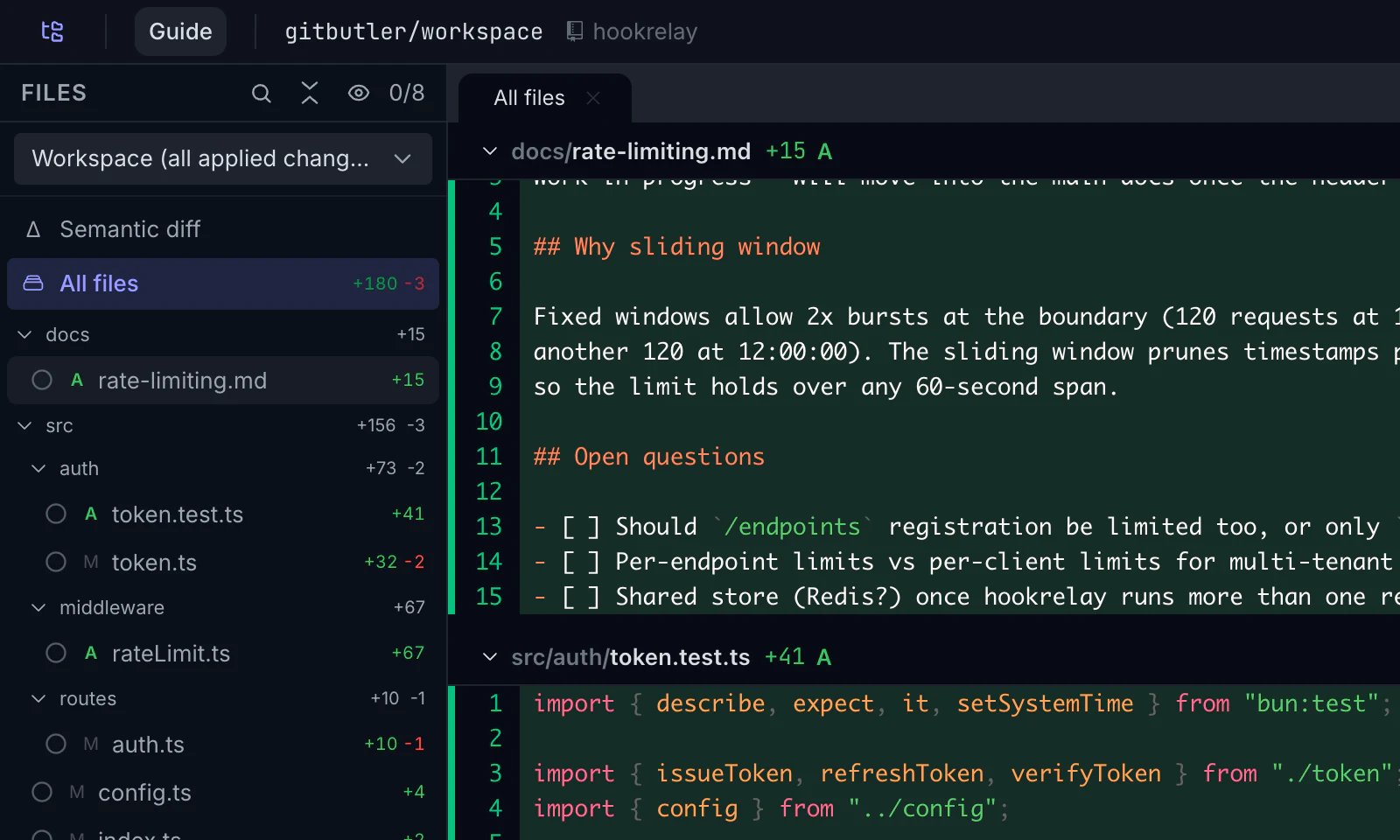
Run `plannotator review` inside an active GitButler workspace. Plannotator detects GitButler and opens the **Workspace** view, which shows all applied committed work, working-tree changes, and untracked files.
```bash theme={null}
cd path/to/gitbutler-workspace
plannotator review
```
 Plannotator reviews local GitButler state. It does not use GitButler's older cloud **Butler Review** feature, which [GitButler says is currently paused](https://docs.gitbutler.com/review/overview).
## Requirements and automatic detection
Use Plannotator v0.24.0 or newer and put the GitButler `but` CLI v0.21.0 or newer on `PATH`. GitButler documents the CLI as its terminal interface for managing, inspecting, and diffing branches in the [GitButler CLI overview](https://docs.gitbutler.com/cli-overview).
Plannotator selects GitButler only when both checks pass:
1. Symbolic `HEAD` is `refs/heads/gitbutler/workspace`. Plannotator also accepts the legacy `refs/heads/gitbutler/integration` ref.
2. The repository has a local `gitbutler.project.targetref` value that starts with `refs/`.
The reserved branch name alone is not enough. A stale GitButler database does not trigger detection by itself. Neither does a normal branch merely named `gitbutler/workspace` without the local target-ref configuration. GitButler explains why its client maintains the synthetic workspace commit in [Workspace Branch](https://docs.gitbutler.com/workspace-branch).
If Plannotator detects the workspace ref and target configuration but cannot use `but`, it stops with a clear error. It does not fall back to a plain Git diff of GitButler's synthetic workspace commit.
## Choose Workspace, Stack, or Branch
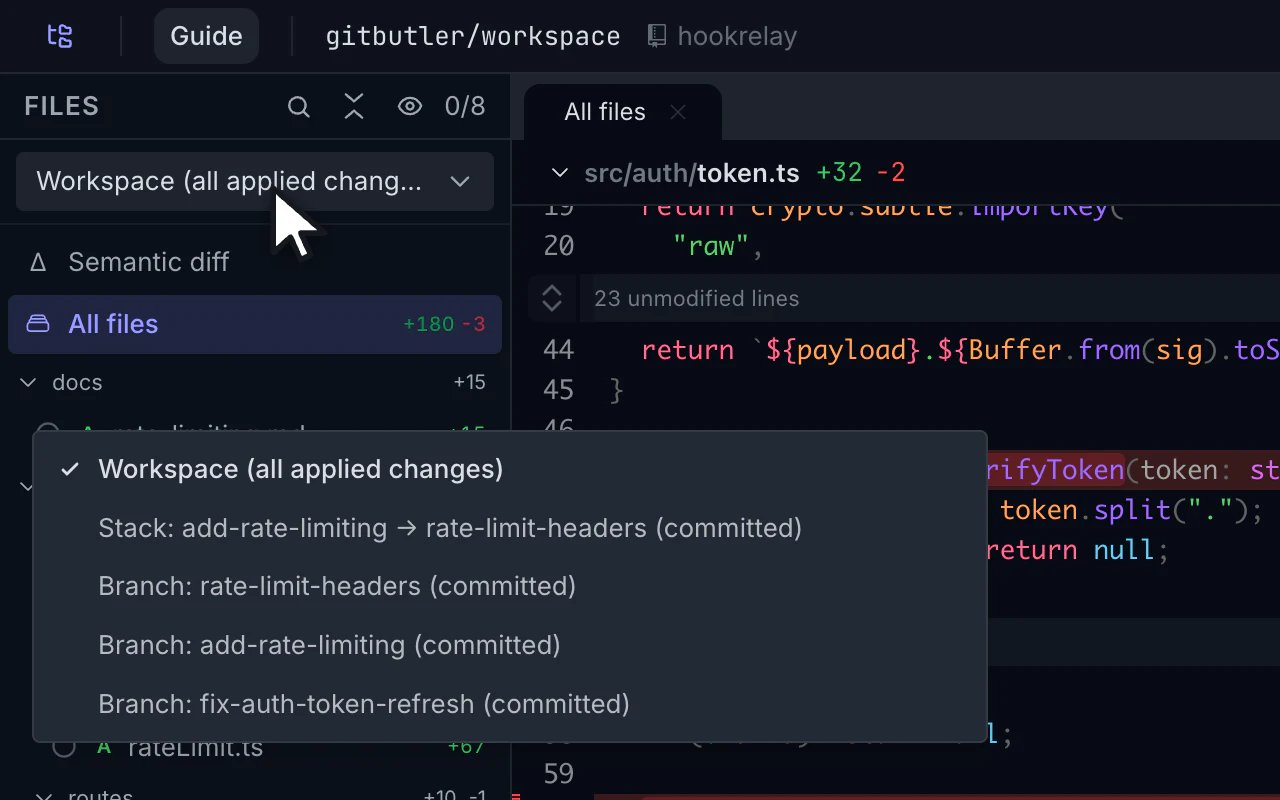
Open the comparison picker to move between the GitButler views available for the current workspace.
Plannotator reviews local GitButler state. It does not use GitButler's older cloud **Butler Review** feature, which [GitButler says is currently paused](https://docs.gitbutler.com/review/overview).
## Requirements and automatic detection
Use Plannotator v0.24.0 or newer and put the GitButler `but` CLI v0.21.0 or newer on `PATH`. GitButler documents the CLI as its terminal interface for managing, inspecting, and diffing branches in the [GitButler CLI overview](https://docs.gitbutler.com/cli-overview).
Plannotator selects GitButler only when both checks pass:
1. Symbolic `HEAD` is `refs/heads/gitbutler/workspace`. Plannotator also accepts the legacy `refs/heads/gitbutler/integration` ref.
2. The repository has a local `gitbutler.project.targetref` value that starts with `refs/`.
The reserved branch name alone is not enough. A stale GitButler database does not trigger detection by itself. Neither does a normal branch merely named `gitbutler/workspace` without the local target-ref configuration. GitButler explains why its client maintains the synthetic workspace commit in [Workspace Branch](https://docs.gitbutler.com/workspace-branch).
If Plannotator detects the workspace ref and target configuration but cannot use `but`, it stops with a clear error. It does not fall back to a plain Git diff of GitButler's synthetic workspace commit.
## Choose Workspace, Stack, or Branch
Open the comparison picker to move between the GitButler views available for the current workspace.
 | View | What Plannotator shows |
| ------------- | ------------------------------------------------------------------------------------------------------------------------------------------------------------ |
| **Workspace** | All applied committed work from GitButler's reported merge base, plus assigned and unassigned working-tree changes and untracked files. This is the default. |
| **Stack** | Committed work from the workspace merge base through the selected stack tip. It does not include assigned or unassigned working-tree changes. |
| **Branch** | The committed commits in one branch layer. The previous layer, or the workspace merge base for the bottom layer, forms the comparison base. |
GitButler defines stacked branches as dependent branches that build on the branches below them. See [Stacked Branches](https://docs.gitbutler.com/features/branch-management/stacked-branches) for GitButler's branch model.
Assigned but uncommitted changes appear only in **Workspace**. GitButler does not expose one authoritative combined patch for a stack plus those assigned changes, so Plannotator does not guess.
## Know the limits of GitButler sessions
GitButler assignments are not the Git index. Plannotator therefore hides stage and unstage controls, Git-status sections, and the commits panel in GitButler sessions.
Committed **Stack** and **Branch** views describe Git objects that may not match the live working tree. Other stacks or later layers can be applied at the same time. In these two views, Plannotator disables:
* Opening a file in an editor or another app
* Code navigation
* Semantic diff
* VS Code annotations
When you expand a file, Plannotator still reads it from the exact committed comparison, not from the live workspace.
When you start a multi-repository review from a parent folder, a GitButler child repository participates only in the aggregate **Current changes** view. Staged, unstaged, and last-change aggregate modes are unavailable when a GitButler child is present.
## Force GitButler or plain Git
Force the GitButler provider when automatic detection is unavailable or when you want a clear setup error:
```bash theme={null}
plannotator review --gitbutler
```
Force the plain Git provider when you intentionally want Git's view of the repository:
```bash theme={null}
plannotator review --git
```
Plain Git can expose the synthetic workspace commit and union index that GitButler maintains. Use the Git escape hatch only when that is the comparison you want.
## Keep annotations tied to the right comparison
Each annotation records the GitButler view, label, merge base, and exact diff snapshot that supplied its line numbers. If you annotate a branch, switch to another view, and then send feedback, Plannotator labels the annotation with the branch comparison where you made it.
| View | What Plannotator shows |
| ------------- | ------------------------------------------------------------------------------------------------------------------------------------------------------------ |
| **Workspace** | All applied committed work from GitButler's reported merge base, plus assigned and unassigned working-tree changes and untracked files. This is the default. |
| **Stack** | Committed work from the workspace merge base through the selected stack tip. It does not include assigned or unassigned working-tree changes. |
| **Branch** | The committed commits in one branch layer. The previous layer, or the workspace merge base for the bottom layer, forms the comparison base. |
GitButler defines stacked branches as dependent branches that build on the branches below them. See [Stacked Branches](https://docs.gitbutler.com/features/branch-management/stacked-branches) for GitButler's branch model.
Assigned but uncommitted changes appear only in **Workspace**. GitButler does not expose one authoritative combined patch for a stack plus those assigned changes, so Plannotator does not guess.
## Know the limits of GitButler sessions
GitButler assignments are not the Git index. Plannotator therefore hides stage and unstage controls, Git-status sections, and the commits panel in GitButler sessions.
Committed **Stack** and **Branch** views describe Git objects that may not match the live working tree. Other stacks or later layers can be applied at the same time. In these two views, Plannotator disables:
* Opening a file in an editor or another app
* Code navigation
* Semantic diff
* VS Code annotations
When you expand a file, Plannotator still reads it from the exact committed comparison, not from the live workspace.
When you start a multi-repository review from a parent folder, a GitButler child repository participates only in the aggregate **Current changes** view. Staged, unstaged, and last-change aggregate modes are unavailable when a GitButler child is present.
## Force GitButler or plain Git
Force the GitButler provider when automatic detection is unavailable or when you want a clear setup error:
```bash theme={null}
plannotator review --gitbutler
```
Force the plain Git provider when you intentionally want Git's view of the repository:
```bash theme={null}
plannotator review --git
```
Plain Git can expose the synthetic workspace commit and union index that GitButler maintains. Use the Git escape hatch only when that is the comparison you want.
## Keep annotations tied to the right comparison
Each annotation records the GitButler view, label, merge base, and exact diff snapshot that supplied its line numbers. If you annotate a branch, switch to another view, and then send feedback, Plannotator labels the annotation with the branch comparison where you made it.
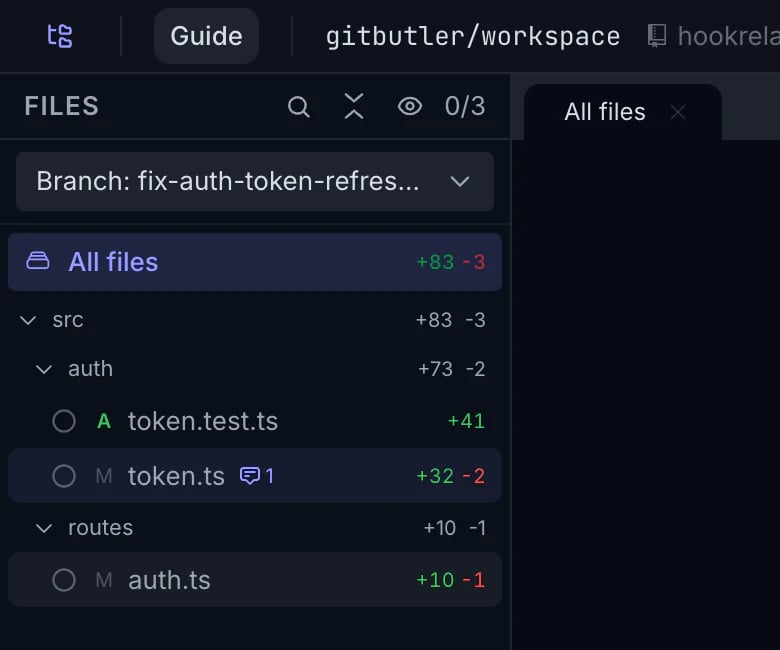 Ask AI and launched agent reviews receive the comparison currently open in Plannotator. For committed Stack and Branch views, the prompt includes the displayed patch and tells the agent to treat it as authoritative. Ordinary filesystem reads or `git diff` can include other applied stacks or later branch layers.
See [Run agent reviews](/open-source/workflows/agent-reviews#run-agents-on-the-intended-comparison) for the read-only agent workflow.
## Troubleshoot GitButler review
### `but` is missing
Plannotator reports:
```text theme={null}
GitButler workspace detected, but the `but` CLI is not on PATH (requires 0.21.0 or newer).
```
Install GitButler's CLI, or expose the `but` command installed with GitButler Desktop, then confirm it is available in the same shell:
```bash theme={null}
but --version
```
### `but` is too old
For an installed v0.20.0 CLI, Plannotator reports:
```text theme={null}
GitButler 0.20.0 is unsupported; Plannotator requires 0.21.0 or newer.
```
Update GitButler until `but --version` reports v0.21.0 or newer. A prerelease such as `0.21.0-beta.1` does not satisfy the minimum.
### Automatic detection does not trigger
Check the two values Plannotator uses:
```bash theme={null}
git symbolic-ref --quiet HEAD
git config --local --get gitbutler.project.targetref
```
The first command should print the GitButler workspace ref. The second should print a configured ref such as `refs/remotes/origin/main`. If either is absent, return to an active GitButler workspace or use `plannotator review --gitbutler` to get the direct provider error.
### Assigned changes are absent from Stack or Branch
This is expected. Select **Workspace** to review assigned or unassigned working-tree changes and untracked files. Stack and Branch remain committed-only.
GitButler support shipped in [Plannotator OSS v0.24.0](https://github.com/backnotprop/plannotator/releases/tag/v0.24.0) through [PR #1067](https://github.com/backnotprop/plannotator/pull/1067). This page was verified against [v0.24.2](https://github.com/backnotprop/plannotator/releases/tag/v0.24.2) on July 22, 2026; v0.24.2 was published on July 21, 2026. Maintained by the Plannotator project.
Ask AI and launched agent reviews receive the comparison currently open in Plannotator. For committed Stack and Branch views, the prompt includes the displayed patch and tells the agent to treat it as authoritative. Ordinary filesystem reads or `git diff` can include other applied stacks or later branch layers.
See [Run agent reviews](/open-source/workflows/agent-reviews#run-agents-on-the-intended-comparison) for the read-only agent workflow.
## Troubleshoot GitButler review
### `but` is missing
Plannotator reports:
```text theme={null}
GitButler workspace detected, but the `but` CLI is not on PATH (requires 0.21.0 or newer).
```
Install GitButler's CLI, or expose the `but` command installed with GitButler Desktop, then confirm it is available in the same shell:
```bash theme={null}
but --version
```
### `but` is too old
For an installed v0.20.0 CLI, Plannotator reports:
```text theme={null}
GitButler 0.20.0 is unsupported; Plannotator requires 0.21.0 or newer.
```
Update GitButler until `but --version` reports v0.21.0 or newer. A prerelease such as `0.21.0-beta.1` does not satisfy the minimum.
### Automatic detection does not trigger
Check the two values Plannotator uses:
```bash theme={null}
git symbolic-ref --quiet HEAD
git config --local --get gitbutler.project.targetref
```
The first command should print the GitButler workspace ref. The second should print a configured ref such as `refs/remotes/origin/main`. If either is absent, return to an active GitButler workspace or use `plannotator review --gitbutler` to get the direct provider error.
### Assigned changes are absent from Stack or Branch
This is expected. Select **Workspace** to review assigned or unassigned working-tree changes and untracked files. Stack and Branch remain committed-only.
GitButler support shipped in [Plannotator OSS v0.24.0](https://github.com/backnotprop/plannotator/releases/tag/v0.24.0) through [PR #1067](https://github.com/backnotprop/plannotator/pull/1067). This page was verified against [v0.24.2](https://github.com/backnotprop/plannotator/releases/tag/v0.24.2) on July 22, 2026; v0.24.2 was published on July 21, 2026. Maintained by the Plannotator project.